> ## Documentation Index
> Fetch the complete documentation index at: https://docs.wrango.io/llms.txt
> Use this file to discover all available pages before exploring further.
# Script Lift report
> Open, read, and filter a Script Lift report in Workspace view
A **Script Lift report** connects campaign exposure to real prescription activity for a brand.
Reports live in **Workspace view** under **Reports**. Both **admins** and **marketers** with workspace access can view them. See [Permissions](/permissions).
To set up a new report, see [Create a Script Lift report](/reports/script-lift/create). For how **Net Impact (Your Audience vs Control)** is calculated, see [Script Lift methodology](/reports/script-lift/methodology).
## Reports dashboard
Open **Reports** from the left navigation in **Workspace view**. The dashboard title is **Reports**.
A tab bar filters the table by report type:
| Tab | What it lists |
| --------------- | --------------------------------------------------------------- |
| **All Reports** | **Campaign**, **Website**, and **Script Lift** reports together |
| **Website** | Website reports only |
| **Campaign** | Campaign reports only |
| **Script Lift** | Script Lift reports only |
**Script Lift** appears as its own tab alongside **Campaign** and **Website** reporting, and Script Lift rows also appear on **All Reports** with a type badge.
Use **Create report** to start a new report. **Search** and **Tags** filters apply to the table. Click a row to open the report or resume a draft builder.
### Script Lift tab columns
* **Name**
* **Status** (**Draft**, **Processing** or **Active**)
* **Associated Campaigns**
* **Tags**
* **Created** (date and author)
## Prerequisites
Only **Active** **Campaigns** with **Script Lift Reporting & Offline Conversion Events** turned on before publish can be added to a Script Lift report. Enable that upgrade in the [Create Campaign Flow](/campaigns/create) **Reporting options** step while the campaign is still a **Draft**, then publish and wait until the campaign is **Active**.
## How to open a report
| Starting point | What happens |
| -------------------------------------- | ----------------------------------------------------- |
| **Script Lift** tab or **All Reports** | Click a **submitted** row to open the detail view |
| **Draft** row | Opens **Create a Script Lift Report** to finish setup |
Script lift data updates every 30 days.
## Report header
Each detail view shows:
* Breadcrumbs: **Reports** / **Script Lift** / report name
* Report **name**
* **Created** date and creator name
* Optional **description**
Status banners can appear on any tab while data loads.Associated **Campaigns** set the **Analysis window** label on each tab (`+6 months post-campaign`).
## Tabs
### Overview
Summarizes media delivery and lists campaigns tied to the report.
| Section | What it shows |
| ----------------------------- | ----------------------------------------------------------------------------------------------------------------------------------------------- |
| **Measure** | **Prescription brands** selected at build time (counts by category depth) |
| **Brand Performance Summary** | **Total Spend**, **Impressions**, **HCPs Reached**, **Avg Frequency**; **Analysis window** when campaigns are linked |
| **Associated Campaigns** | **Campaign**, **Status**, **Tags**, **Total Spend**, **Impressions**, **HCPs Reached**, **Avg Frequency** (sparklines on spend and impressions) |
### Growth
Switch between **Total Impact (Gross)** and **Net Impact (Your Audience vs Control)**.
#### Total Impact (Gross)
Measures full prescribing volume among exposed HCPs and patients within **6 months after last exposure**. **New** prescribers use a **720-day** lookback; **new** patients use a **180-day** lookback.
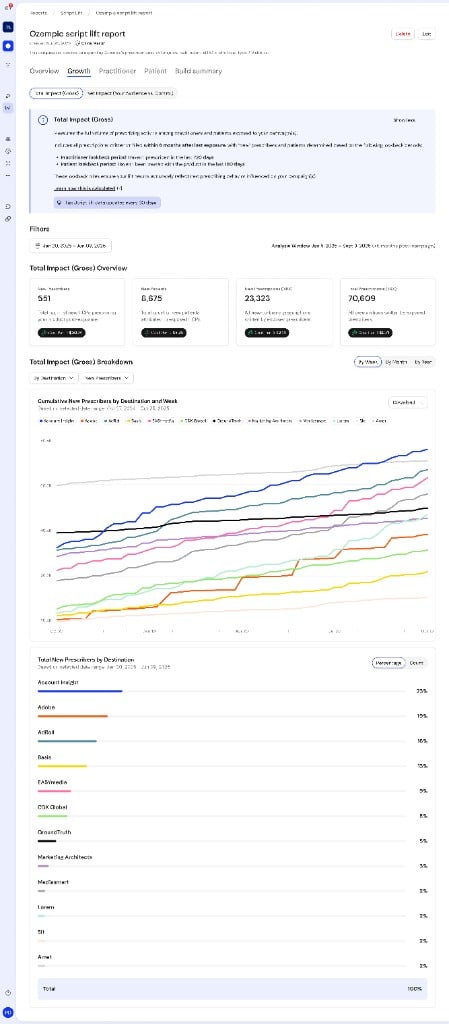 | Section | Controls | What it shows |
| ---------------------------------- | ---------------------------------------------------------------------------------------------------------------------- | -------------------------------------------------------------------------------------------------------------------------------------------- |
| **Filters** | **Select date range**; **Analysis window** | Limits gross metrics and charts to a chosen range |
| **Total Impact (Gross) Overview** | Four fixed metrics | **New Prescribers**, **New Patients**, **New Prescriptions (NRX)**, **Total Prescriptions (TRX)**; each tile includes a **Cost Per →** badge |
| **Total Impact (Gross) Breakdown** | **By Week** / **By Month** / **By Year**; **By Destination** / **By Campaign** / **By Creative Type**; metric selector | **Cumulative** line chart with series legend; **Total … by …** bar list with **Percentage** / **Count** toggle |
The line chart title follows the pattern **Cumulative** `{metric}` **by** `{dimension}` **and** `{Week|Month|Year}`. Use **Download** on the chart card to export the chart.
#### Net Impact (Your Audience vs Control)
Shows incremental prescribing versus the control group after baseline adjustment, using the same **6-month** exposure window and **720-day** / **180-day** new-entity lookbacks. See [Script Lift methodology](/reports/script-lift/methodology) for the matching logic behind this view.
| Section | Controls | What it shows |
| ---------------------------------- | ---------------------------------------------------------------------------------------------------------------------- | -------------------------------------------------------------------------------------------------------------------------------------------- |
| **Filters** | **Select date range**; **Analysis window** | Limits gross metrics and charts to a chosen range |
| **Total Impact (Gross) Overview** | Four fixed metrics | **New Prescribers**, **New Patients**, **New Prescriptions (NRX)**, **Total Prescriptions (TRX)**; each tile includes a **Cost Per →** badge |
| **Total Impact (Gross) Breakdown** | **By Week** / **By Month** / **By Year**; **By Destination** / **By Campaign** / **By Creative Type**; metric selector | **Cumulative** line chart with series legend; **Total … by …** bar list with **Percentage** / **Count** toggle |
The line chart title follows the pattern **Cumulative** `{metric}` **by** `{dimension}` **and** `{Week|Month|Year}`. Use **Download** on the chart card to export the chart.
#### Net Impact (Your Audience vs Control)
Shows incremental prescribing versus the control group after baseline adjustment, using the same **6-month** exposure window and **720-day** / **180-day** new-entity lookbacks. See [Script Lift methodology](/reports/script-lift/methodology) for the matching logic behind this view.
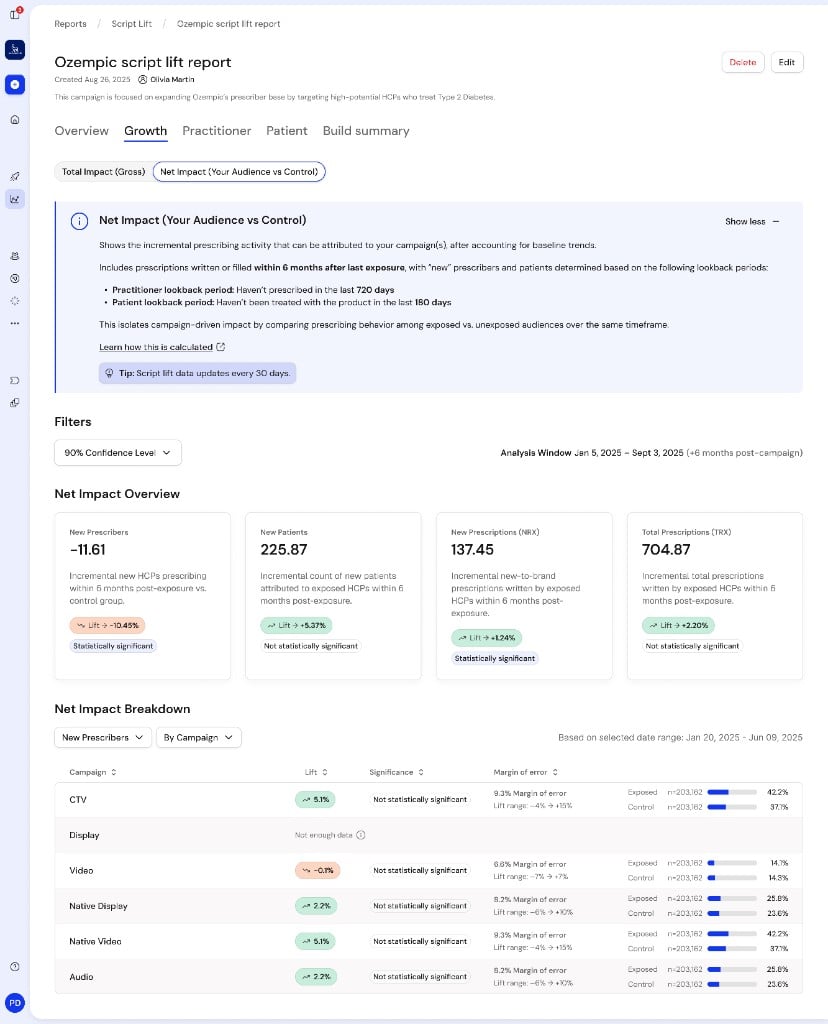 | Section | Controls | What it shows |
| ------------------------ | --------------------------------------------------------------------------- | ---------------------------------------------------------------------------------------------------------------------------------------------------------------------------------------------------- |
| **Filters** | **80%** / **85%** / **90%** / **95% Confidence Level**; **Analysis window** | Confidence applies to overview cards and breakdown rows |
| **Net Impact Overview** | Four metrics | **Absolute impact** value, **Lift →** percentage pill (green up / orange down), **Statistically significant** or **Not statistically significant**; **Not enough data** when results are unavailable |
| **Net Impact Breakdown** | Metric selector; **By Campaign** / **By Channel** / **By Destination** | Table: dimension name, **Lift**, **Significance**, **Margin of error** (with **Lift range**), **Exposed** and **Control** bars with `n=` sample sizes |
### Practitioner
**Total Impact (Gross) — Practitioner** describes gross prescribing among exposed HCPs; **new** prescribers use a **720-day** lookback.
| Section | Controls | What it shows |
| -------------------------- | -------------------------------------------------- | ------------------------------------------------------------------------------------------------------------------------------------------------- |
| **Filters** | **All campaigns** or one campaign; **Quick views** | **HCPs Reached**, **Total Attributed HCPs** (TRx badge), **New-to-Brand Prescribers** (NBRx badge) |
| Conversion summary | — | Headline count, **HCPs Reached**, **Conversion Rate** |
| **Practitioner Breakdown** | percentage / count | **By specialty**, **Competitive Overlap**, **Prescriber Condition Match**, **By decile**, **By state**, **By city**, **By device**, **By gender** |
### Patient
**Total Impact (Gross) — Patient** covers patients prescribed by exposed HCPs; **new** patients use a **180-day** lookback.
| Section | Controls | What it shows |
| --------------------- | ----------------------------------------------------------------------------- | --------------------------------------------------------------------- |
| **Filters** | **All campaigns** or one campaign; **Quick views** | **Total Attributed Patients** (TRx), **New-to-Brand Patients** (NBRx) |
| Conversion summary | — | Headline count, **Total Patients**, **Conversion Rate** |
| **Patient Breakdown** | **By age**: **All** / **Female** / **Male** / **Unknown**; percentage / count | **By gender**, **By state**, **By payer** (table), **By payer type** |
### Build summary
Read-only recap of report setup:
* **Tags**
* **Measure** (prescription brand depths)
* **Category** (competitive categories)
* **Conditions**
* **Lookback window**: **Prescriber** **720 days**, **Patient** **180 days**
## Related documentation
* [Create a Script Lift report](/reports/script-lift/create): builder steps and campaign prerequisites
* [Script Lift methodology](/reports/script-lift/methodology): control twin matching and significance
* [Permissions](/permissions): **Admin** and **Marketer** access in **Workspace view**
| Section | Controls | What it shows |
| ------------------------ | --------------------------------------------------------------------------- | ---------------------------------------------------------------------------------------------------------------------------------------------------------------------------------------------------- |
| **Filters** | **80%** / **85%** / **90%** / **95% Confidence Level**; **Analysis window** | Confidence applies to overview cards and breakdown rows |
| **Net Impact Overview** | Four metrics | **Absolute impact** value, **Lift →** percentage pill (green up / orange down), **Statistically significant** or **Not statistically significant**; **Not enough data** when results are unavailable |
| **Net Impact Breakdown** | Metric selector; **By Campaign** / **By Channel** / **By Destination** | Table: dimension name, **Lift**, **Significance**, **Margin of error** (with **Lift range**), **Exposed** and **Control** bars with `n=` sample sizes |
### Practitioner
**Total Impact (Gross) — Practitioner** describes gross prescribing among exposed HCPs; **new** prescribers use a **720-day** lookback.
| Section | Controls | What it shows |
| -------------------------- | -------------------------------------------------- | ------------------------------------------------------------------------------------------------------------------------------------------------- |
| **Filters** | **All campaigns** or one campaign; **Quick views** | **HCPs Reached**, **Total Attributed HCPs** (TRx badge), **New-to-Brand Prescribers** (NBRx badge) |
| Conversion summary | — | Headline count, **HCPs Reached**, **Conversion Rate** |
| **Practitioner Breakdown** | percentage / count | **By specialty**, **Competitive Overlap**, **Prescriber Condition Match**, **By decile**, **By state**, **By city**, **By device**, **By gender** |
### Patient
**Total Impact (Gross) — Patient** covers patients prescribed by exposed HCPs; **new** patients use a **180-day** lookback.
| Section | Controls | What it shows |
| --------------------- | ----------------------------------------------------------------------------- | --------------------------------------------------------------------- |
| **Filters** | **All campaigns** or one campaign; **Quick views** | **Total Attributed Patients** (TRx), **New-to-Brand Patients** (NBRx) |
| Conversion summary | — | Headline count, **Total Patients**, **Conversion Rate** |
| **Patient Breakdown** | **By age**: **All** / **Female** / **Male** / **Unknown**; percentage / count | **By gender**, **By state**, **By payer** (table), **By payer type** |
### Build summary
Read-only recap of report setup:
* **Tags**
* **Measure** (prescription brand depths)
* **Category** (competitive categories)
* **Conditions**
* **Lookback window**: **Prescriber** **720 days**, **Patient** **180 days**
## Related documentation
* [Create a Script Lift report](/reports/script-lift/create): builder steps and campaign prerequisites
* [Script Lift methodology](/reports/script-lift/methodology): control twin matching and significance
* [Permissions](/permissions): **Admin** and **Marketer** access in **Workspace view**